
Read the carrier status before describing the shipment
UPS says Label Created means it has received shipment details and billing information. Its status updates once it has possession and the shipment is moving in its network. FedEx defines Label created as preparation of the label; its separate We have your package status means the parcel has entered the FedEx network. [1, 2]
Record the carrier's exact wording and when you checked it. A label-only event gives you no confirmed carrier possession from that tracking page. It also does not prove the supplier still has the parcel: the handover may need further verification.
Shopify's own fulfillment record can precede physical dispatch. For labels purchased in Shopify, buying and printing the label marks the order fulfilled in the admin. For split orders, check the affected fulfillment and quantities before describing what has dispatched. Check the carrier evidence separately when answering a movement question. [3]
Confirm the tracking details refer to the intended parcel
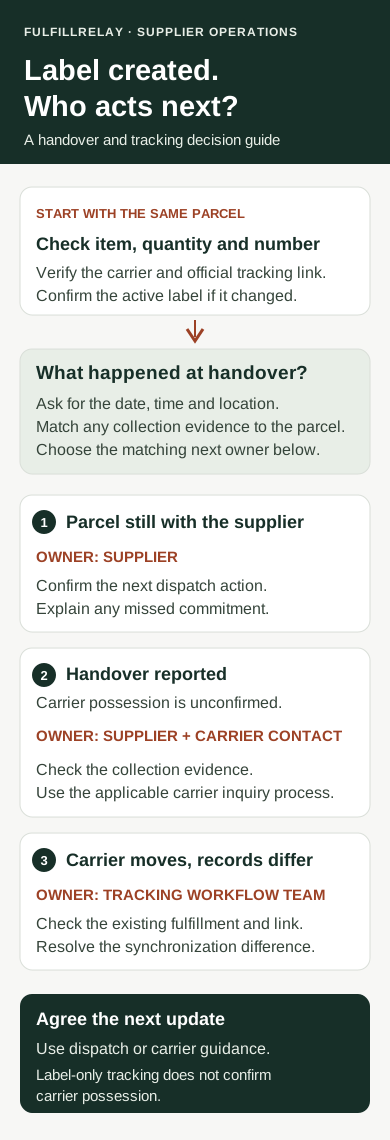
Compare the number and carrier on the supplier's fulfillment with the details on the retailer's order. Open the carrier's official tracking page directly and enter the number there. Check the relevant item and quantity so the investigation stays tied to the affected parcel.
Shopify documents that automatic carrier detection can select the wrong carrier when number formats overlap. A third-party app should supply the carrier and tracking URL with the number. If the carrier is wrong, follow the applicable workflow to select the correct carrier or provide its full tracking URL. [4]
Ask whether the supplier replaced or reprinted a label. Confirm which number is active and which label is actually on the parcel before correcting a record. Keep the old reference in your internal history so a colleague can understand the change.
If the carrier page shows movement while the customer link does not, investigate the link or record difference first. If both stores show the same correct number and the carrier still shows only label preparation, move to the handover check.
Ask the supplier for evidence of handover
Give the supplier the existing order reference, affected items and tracking number. Ask for a specific dispatch update:
- Is the parcel packed and still at the supplier, or has it been handed over?
- If handed over, what was the date, time and time zone?
- Which pickup or drop-off location handled it?
- Is there a carrier receipt or collection record identifying this parcel or its tracking number?
- If it is still waiting, what is the confirmed next dispatch action?
A pickup booking describes planned work. Ask for confirmation that collection occurred. Where a collection record covers several parcels, have the supplier identify how the affected parcel is included. Keep any limits in the evidence visible.
For example, a label created in the morning with an agreed afternoon pickup needs a different follow-up before and after that pickup. Before the checkpoint, confirm the plan. After a missed checkpoint, ask for the revised dispatch action or the handover record. These are operational checkpoints your team agrees with the supplier, not carrier-wide waiting rules.
Send the issue to the team that can resolve it
Use the evidence to choose the next owner:
- Parcel still with the supplier: the supplier confirms dispatch and explains any missed commitment
- Supplier reports handover, carrier possession unconfirmed: the supplier checks its collection evidence and contacts the carrier through the applicable shipping-account process
- Carrier tracking moves, retailer tracking differs: the team responsible for the tracking workflow checks the existing fulfillment and synchronization
FulfillRelay's tracking workflow brings supplier fulfillment tracking back to the original retailer order. If details are missing there, compare the connected supplier order, fulfilled quantity and existing workflow status. Background processing can take time; resolve the existing handoff before creating another supplier order. [5]
Keep physical dispatch and tracking correction assigned separately when both need work. A tracking edit should leave the next colleague able to identify the same parcel and its current owner.
Set a checkpoint around the actual dispatch commitment
Agree when the supplier or carrier contact will report back. Base that checkpoint on the promised dispatch, pickup arrangement, service and the carrier's current guidance. Label age alone is a poor basis for deciding to replace the goods.
Once carrier possession or transit is confirmed, use the carrier's transit guidance. UPS notes that long-distance shipments may receive no further scan until the destination hub. FedEx says scan frequency varies and an in-transit shipment can go more than 24 hours without an update. Those statements concern transit gaps; they do not establish a universal waiting period for Label Created. [1, 2]
Before approving a replacement, establish what is known about the original parcel and coordinate the resolution with the supplier. Record the decision under your store's policy and applicable obligations. Keep uncertainty explicit if the original shipment could still arrive.
Give the customer a precise update and keep the case assigned
If possession remains unconfirmed, a useful update is: “The tracking label has been created for [item and quantity]. We're checking the carrier handover with the supplier and will update you by [date, time and time zone].” Use an update time your team can meet.
If the supplier reports collection but the tracking page has not confirmed possession, describe that distinction accurately. Avoid supplying a new delivery date until you have a supported estimate. Shopify's shipping confirmation can be triggered by fulfillment; review what the customer has already received so your reply explains the current evidence. [6]
Keep the status checked, supplier response, evidence, owner and next checkpoint together. Shopify's order Timeline supports internal comments and attachments; those comments are not visible to the customer, so send the customer update separately. [7]
Close this pre-transit check when dispatch is verified or the agreed resolution is recorded. If the shipment then needs a transit investigation, hand it over with the carrier evidence and a named owner. Clear ownership at each stage keeps a label-only update from becoming an open-ended support loop.
Sources
Sources checked October 6, 2026. Carrier wording and Shopify controls can change; review the current documentation and the records for the shipment you are handling.
- UPS: Understanding tracking statusUPS · Checked
- FedEx: Tracking and managing deliveriesFedEx · Checked
- Shopify: Fulfilling your own orders individuallyShopify Help Center · Checked
- Shopify: Order tracking at ShopifyShopify Help Center · Checked
- FulfillRelay: Sync supplier tracking back to Shopify ordersBoreal Meridian Commerce Inc. · Checked
- Shopify: Setting up customer notificationsShopify Help Center · Checked
- Shopify: Viewing and managing order detailsShopify Help Center · Checked