Skip to content

Find your fit. Routing from $49/month. Returns free for 5 cases/month.

See pricing
FulfillRelay
Choose your app

Product demos

See the workflow.
Find your fit.

From supplier orders to customer returns. Watch the apps in action, explore the screens and see how to get started.

Two Shopify apps. Choose the workflow your store needs.

Start here0:44
Two apps. One quick introduction.Get the overview in 44 seconds.
Read video text : FulfillRelay: supplier orders and customer returns
  1. Supplier orders. Customer returns. So much chasing.

  2. Meet FulfillRelay. Two focused Shopify apps, built around your operation.

  3. FulfillRelay connects your store to the suppliers you already work with. Match each product to an exact supplier SKU. Route eligible paid orders and watch tracking flow back to your customer’s order.

  4. FulfillRelay Returns gives customers a branded portal with email verification. You see the photos and the rules, get optional AI suggestions, and make every decision yourself.

  5. Start free with five return cases a month. Less chasing. More running your store.

Watch the workflow

Your next step,
in under a minute.

Choose supplier routing and returns together, or a dedicated returns app. You can start with either one.

Supplier operations + returns01

FulfillRelay

Match exact products, route eligible paid orders and follow supplier tracking back. Customer returns are included in the app.

Explore FulfillRelay
Product demo0:42
Read video text : FulfillRelay: supplier orders and tracking
  1. A new order. Great. Another email to your supplier? Not so great.

  2. Keep the suppliers you already work with. Connect your Shopify stores with FulfillRelay.

  3. Take this sweater. Match it to the exact supplier variant, then get their approval.

  4. Now, route eligible paid orders. Anything that needs attention stays visible.

  5. Your supplier accepts and fulfills in their own Shopify store.

  6. Tracking comes back to the original order. Less chasing. A clearer handoff.

  7. Start small. Follow one order all the way through. That’s FulfillRelay.
Standalone customer returns02

FulfillRelay Returns

A branded portal for your customers. One workspace to review requests, photos and rules. Every decision stays with your store.

Explore Returns
Product demo0:40
Read video text : FulfillRelay Returns: customer returns
  1. Can I return this? A simple question. A messy email thread.

  2. Give customers your branded returns portal. They verify their order email before choosing an item.

  3. See the reason, photos, and return rules together. No digging through separate messages.

  4. You approve or decline. Optional AI suggestions can help. Refunds remain a separate decision.

  5. Follow the return through shipping and receipt, then review any refund before confirming it.

  6. Start free with five return cases a month. FulfillRelay Returns works on its own.

Take the tour

Click through the product. No install.

Real screens from each app, shown with demo data. Pick an app, then step through.

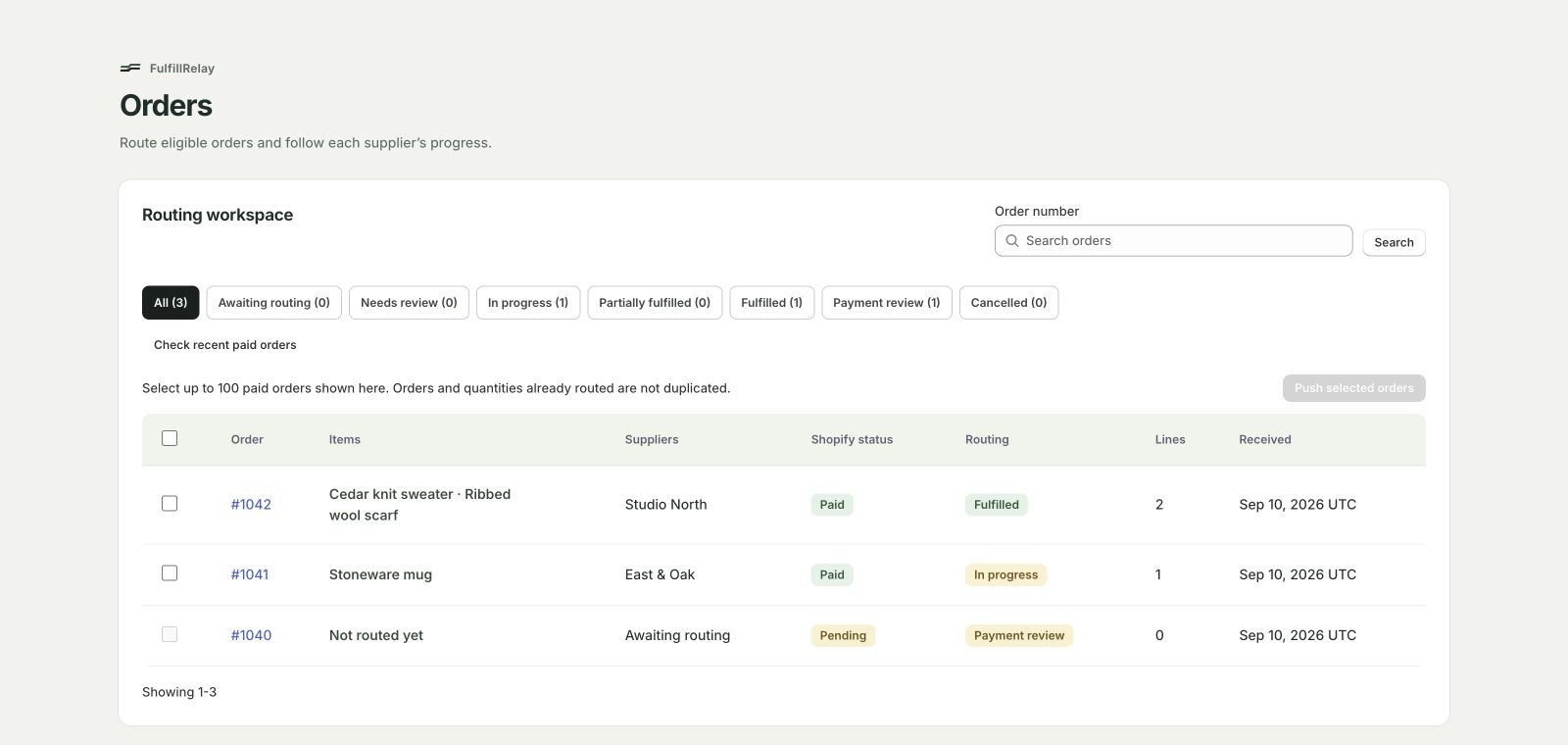
FulfillRelay routing workspace listing orders with supplier, Shopify status and routing status
See every order's routing statusPaid orders, the supplier on each one and where it stands, from awaiting routing to fulfilled. Orders and quantities already routed are not duplicated.View full size (opens in a new tab)
Step 1 of 3

Ready to get started?

One clear first step.

Follow a short setup guide, then try your first supplier order or customer return.

Setup guide1:10

Connect your first supplier

Connect both Shopify stores, confirm a product match and follow your first eligible order.

Read the supplier setup guide
Read video text : Get started with FulfillRelay
  1. Install FulfillRelay in your Shopify store. Your supplier installs it in their own store to receive your orders.

  2. Add your supplier and send an invitation. They accept the connection and choose their receiving Shopify store.

  3. Choose your product and its supplier SKU. Your supplier confirms the exact variant and settlement price.

  4. Find paid orders with approved product matches. Review any items that need attention before routing.

  5. Your supplier accepts and fulfills the order in Shopify. Tracking returns to your original customer order.

  6. Review the covered orders and total, then continue to Shopify checkout. Your supplier receives payment directly.

  7. Connect one supplier, match one product and follow your first eligible order. Get started at fulfillrelay.com.

Setup guide1:24

Set up customer returns

Publish your rules, share your portal and review a return request through to resolution.

Read the returns setup guide
Read video text : Get started with FulfillRelay Returns
  1. Install FulfillRelay Returns for a dedicated returns workspace. It works independently of the main FulfillRelay app.

  2. Choose your return window and review requirements. Publish your rules and select the customer updates to send.

  3. Add your portal link to your store. Customers enter their order number and the email used at checkout.

  4. Customers enter the code sent to their order email before choosing an item and submitting their return request.

  5. Review the reason, photos and return-rule results together. Ask for an optional AI suggestion when you need support.

  6. Approve or decline the request yourself. Approved returns move to return shipping; refunds are confirmed separately.

  7. Upload a carrier-prepared label PDF, record the returned item and review any refund before confirming it.

  8. Get five return cases and five optional AI reviews each month. Install from Shopify at fulfillrelay.com/returns-app.

Another quick introduction 0:41

FulfillRelay and FulfillRelay Returns

Find the workflow for your store: supplier order routing with FulfillRelay, or customer returns with FulfillRelay Returns.

Read video text : FulfillRelay and FulfillRelay Returns
  1. Orders going out. Returns coming in. Two different jobs. Give each one a clear workflow.

  2. FulfillRelay connects your Shopify store with your existing suppliers. Match products, route eligible orders, and get tracking back.

  3. FulfillRelay Returns gives customers a branded portal, and you a workspace to review requests and decide what happens next.

  4. Need supplier order routing? Start with FulfillRelay. Managing customer returns? Choose FulfillRelay Returns.

  5. Separate apps. Separate subscriptions. Explore both at fulfillrelay.com.

Still deciding which app fits?Compare the apps Before you install
Explore routingStart Returns free