
Capture the current catalog and open handoffs
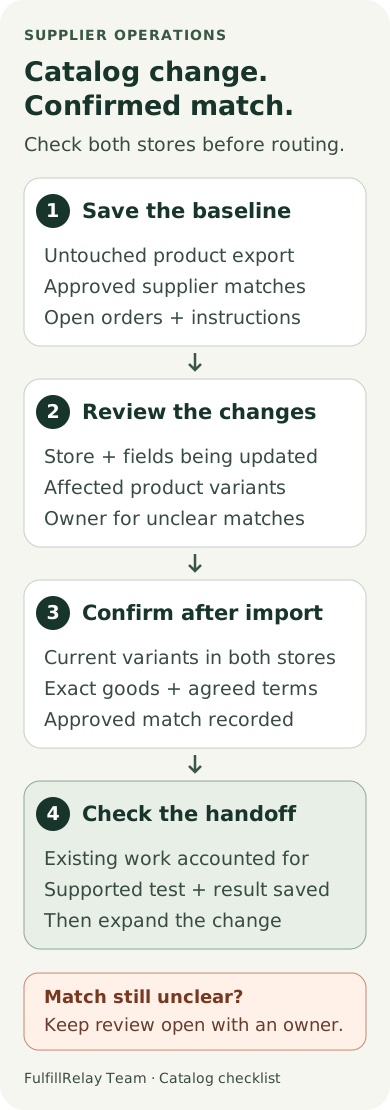
Export the products you plan to update and keep an untouched copy. Shopify supports exports of selected products or a filtered product list. It also warns that sorting a product CSV in a spreadsheet can separate variants or images from their products and lead to damaging imports. Preserve the file's structure while preparing your changes. [3]
Alongside that export, save the current supplier mapping records available in your routing workflow. For each affected item, record the retailer store and variant, the supplier store and exact counterpart, their SKUs, and the agreed supplier price and currency. Keep the record outside the CSV you are editing. A product export alone does not confirm the relationship between two stores.
List any outstanding customer orders and supplier handoffs for those items. Include the last confirmed instruction and who is responsible for dispatch. Agree how new orders will be handled during the change window, and give unresolved matches a review owner.
Shopify says product CSV imports cannot be canceled after they start, and past-import history is unavailable. Review recent changes in the activity log and retain your files. [2]
Check the import fields that can affect the match
Review the changed columns before uploading. Shopify documents several behaviors that matter to supplier routing:
- Changes in the Option1 value, Option2 value or Option3 value columns replace existing variant IDs with new ones. Shopify warns this can break third-party dependencies on those IDs. [1]
- With matching-handle overwrite enabled, a blank non-required field can clear the existing value. Omitting a non-required column generally preserves it, but column dependencies and defaults need a separate check. [2]
- Variant-related updates, such as a SKU change, require the corresponding variant data. Shopify specifically requires Option1 name and Option1 value for that case; leaving them out can create a default variant and delete existing variants. [1]
A SKU-only edit and an option-value change therefore deserve different checks. Do not assume every import replaces IDs, or that an unchanged SKU proves the variant reference survived. Compare the actual fields your file will update.
Consider a hypothetical supplier that changes a shirt's color value from Navy to Midnight in its CSV. Even if the physical shirt and SKU are unchanged, the documented option-value behavior means the resulting variant reference needs checking. Ask whether the change is only a label adjustment or describes different goods before agreeing the new match. [2]
Compare the actual variants after the import
Inspect the updated products in the store that received the import, then compare them with the approved counterpart in the other store. Work from the current records rather than the intended spreadsheet alone.
Check size, color, pack quantity and any other attribute that changes what a shopper receives. Confirm that one retail unit still corresponds to the agreed supplier unit. A single bottle and a six-bottle pack need an explicit agreement even when their names look similar.
Shopify recommends unique variant SKUs and warns that duplicates can cause inventory and third-party integration issues. Its SKU guidance also calls for exact case and spacing when matching an app's SKU field. Keep both stores' codes with the approved pair and resolve any mismatch through the mapping process. [4, 5]
For FulfillRelay, the documented match is between the retailer variant and the supplier's exact variant, with supplier confirmation of the item, price and currency. Review changed or unmapped items using the actual app process. [5] Verify the approved result before treating the catalog change as complete.
If an identifier, attribute or agreed term differs, keep that item in review. Write down whether the result is the same match confirmed, a replacement match approved, or an unresolved exception. Avoid automatically choosing the nearest product name.
Keep existing orders tied to their confirmed instructions
Check existing work separately from the mapping you will use for new orders. For each affected customer line, find any supplier order already created and compare its variant, quantity and dispatch instruction with the pre-import record.
A refreshed catalog match is too little evidence to conclude that an existing supplier order changed. Ask the supplier what its outstanding order still instructs it to ship. If a correction is required, coordinate that specific order through the agreed change process before creating another handoff.
Record the supplier reference and latest confirmed state so the next person can distinguish an old order needing attention from a new order ready to route. When a customer has requested a different item, handle that request as a separate order change rather than folding it into catalog maintenance.
Test a checked match before increasing the scope
For Shopify Partners performing a large import for a merchant, Shopify recommends testing a small subset in a dev store first. [2] Build a controlled check around a changed variant and an unaffected counterpart, with the supplier involved before any order is sent.
Use a suitable test environment and a supported Shopify test-order method. Shopify's test-order guidance covers checkout and order-processing checks, and warns that live customers cannot order while the payment provider is in test mode. [6]
Establish whether your routing workflow supports the intended test path and how both stores will prevent an unintended purchase or shipment. A simulated customer checkout alone does not verify a supplier handoff.
For a supported end-to-end test, compare the source line, current approved supplier variant, quantity and agreed terms with the downstream record. Confirm that only the intended work is created and account for any order already present before retrying. Keep the outcome with the catalog-change record.
Close the change with a usable record
Before expanding the update, keep:
- The store, products and fields changed, with the original and imported files
- The previous and current retailer-to-supplier matches
- Supplier confirmation of the exact goods and agreed terms
- Existing orders checked, including unresolved corrections
- The controlled test result, remaining exceptions and responsible person
Close each affected item when its current match and outstanding work are accounted for. If some items remain uncertain, give them a next action and review time. This leaves your team able to explain what changed and which supplier instruction it can rely on.
Sources
Sources checked October 9, 2026. Shopify Help Center pages are maintained documentation; review the current CSV format and the routing process used by the stores involved. The catalog-change checklist and examples are an operational framework for applying that guidance.
- Shopify: Using CSV files to import and export productsShopify · Checked
- Shopify: Importing products with a CSV fileShopify · Checked
- Shopify: Exporting productsShopify · Checked
- Shopify: Using SKUs to manage your inventoryShopify · Checked
- FulfillRelay: Route Shopify orders to suppliers by SKUBoreal Meridian Commerce Inc. · Checked
- Shopify: Placing a test orderShopify · Checked