
Start with the shipping system your store actually uses
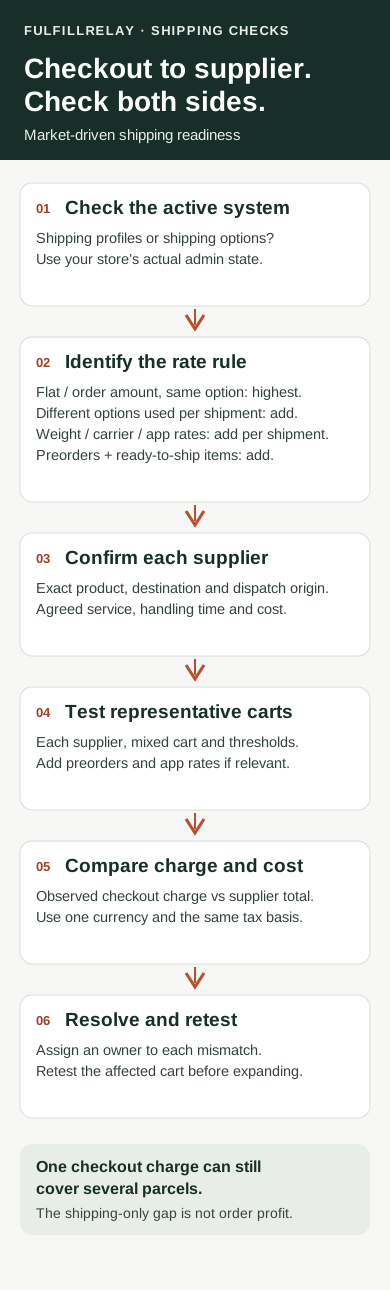
Open Settings > Shipping and delivery. Shopify's upgrade guide distinguishes shipping profiles, zones and rates from the new Shipping options section organized by market. Stores keep their existing setup until upgraded; the rollout is gradual.
The guide says existing rates migrate during the upgrade, and rates with the same shipping option name are consolidated. Review the result rather than assuming the old checkout total will remain unchanged. Check any shipping-app compatibility banner and make sure the person managing the new setup has the required Markets permission.
Before a change, keep a record of your current options, conditions and a few representative checkout results. That gives you something concrete to compare with the new setup.
Know when rates combine and when they add up
Shopify's rate-type documentation makes an important distinction:
- Flat and order amount rates: when several rates match within the same shipping option, the highest matching rate is charged
- Different options used for different items or shipments in one cart: those selected charges are added together
- Weight-based, carrier-calculated and app-calculated rates: calculated per shipment and added together when an order is split
- App-provided rates managed by a shipping app: also added per shipment
- Preorders and items shipping immediately: their rates are added even when they belong to the same shipping option
For eligible flat or order amount rates shared across shipments, checkout can label other shipments Included. That label describes the customer's shipping charge. It does not establish that a supplier will pack those items together or ship them for free. Shopify's split-shipping guide explains these checkout choices and exceptions.
Match the checkout offer to each supplier's actual service
For every product group, confirm who will dispatch it, which destinations they serve, the service they can use, their handling time and the shipping charge you expect. Keep supplier handling time separate from carrier transit time when reviewing a delivery estimate.
Shopify's setup instructions let rates apply to particular product collections and fulfillment locations. Check those conditions against your store's real configuration. An independent supplier relationship alone is not enough information to decide which location or rate condition belongs on the retailer's checkout.
FulfillRelay's supplier workflow connects retailers and existing suppliers who each operate their own Shopify store. Approved mappings route eligible paid lines; the supplier accepts and fulfills in its store, and tracking returns to the retailer order. Use the SKU routing guide to verify the exact product handoff. Separately confirm how your checkout settings represent those products and the delivery service the supplier will provide.
Test the carts that expose a mismatch
Use a development store or an approved test-order process. Start a fresh checkout for each check: Shopify warns that an abandoned checkout retains its previous rates and can mislead a test of changed settings. Its shipping troubleshooting guide also identifies discounted cart values, product weights, package details and shipping origins as important checks.
Build a short test set:
- One product from each supplier, tested separately at a destination you serve
- A mixed-supplier cart with matching flat or order amount rates in one option
- A cart selecting different options for different shipments, where available
- Carts just below, at and above your order-value or weight thresholds, including a relevant discount
- A preorder combined with an item ready to ship, if your store offers preorders
- A cart using carrier or app-provided rates, if you rely on them
For each case, record the destination region, cart contents, rate type, selected option, observed total, displayed shipment groups and delivery estimates. Compare the displayed service with what each supplier has agreed to provide. Mark an irrelevant case as not applicable; leave an untested case open.
Check the shipping gap before expanding the change
Compare the observed customer shipping charge with the total expected supplier shipping charges for the same cart and destination. Use one currency and the same tax basis. If a cost is unknown, get a quote before treating the comparison as complete.
The difference is a shipping-only gap, not order profit. It excludes product costs, payment fees, duties and other expenses. A merchant may intentionally subsidize shipping, but the amount should be a deliberate choice. A lower checkout charge does not, by itself, show that the underlying fulfillment costs fell.
If an option disappears or a total looks wrong, give the issue an owner and retest the affected cart after correction. Check the store's actual shipping system, applicable conditions and rate-provider compatibility before changing more settings.
Keep the resulting test record with your supplier service agreements. Once checkout and supplier expectations agree, follow each routed order through acceptance and fulfillment. Clear customer pricing is most useful when the team shipping each item can deliver the service it represents.
Sources
Sources checked October 5, 2026. Shopify availability and settings can change; check your store's current admin and the linked documentation.
- Peak Season Fulfillment on Shopify: What's New for 2026 — ShopifyShopify · Checked
- Shipping options by market — Shopify Help CenterShopify Help Center · Checked
- Upgrading from shipping profiles to shipping options by market — Shopify Help CenterShopify Help Center · Checked
- Understanding shipping options by market — Shopify Help CenterShopify Help Center · Checked
- Split shipping in Shopify Checkout — Shopify Help CenterShopify Help Center · Checked
- Setting up shipping options for a market — Shopify Help CenterShopify Help Center · Checked
- Troubleshooting and testing shipping rates — Shopify Help CenterShopify Help Center · Checked
- Shopify Supplier Order Routing — FulfillRelayFulfillRelay · Checked
- Route Shopify orders to suppliers by SKU — FulfillRelayFulfillRelay · Checked