
Build a record for each shipment
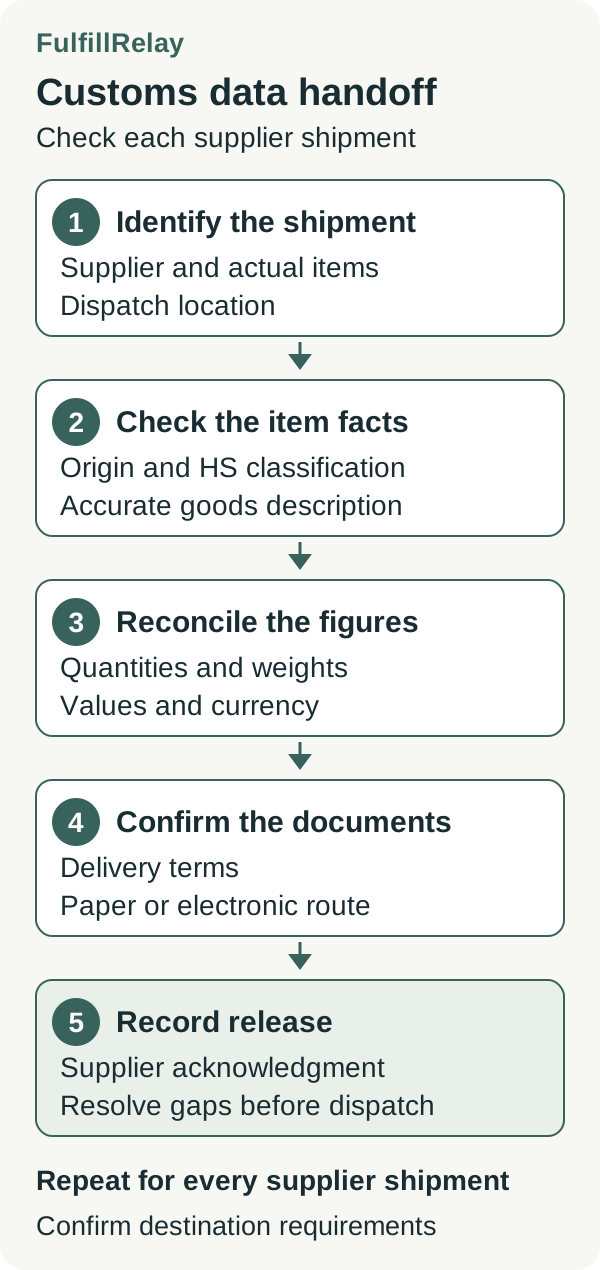
Start with the items allocated to a supplier and the location they will leave from. Give the shipping owner a line-by-line record tied to the Shopify order and the supplier's item references. For the labels covered by Shopify's customs guidance, each item needs an HS code of at least six digits, country or region of origin, goods description, quantity, value and weight.
Add practical ownership fields alongside those details: who supplied the information, when it was checked and who will prepare the declaration. Ask the supplier to flag substitutions, changed materials or a different manufacturing source before packing. Those changes deserve another review of the item data.
Keep a separate record for each shipment when multiple suppliers are involved. A complete response from Supplier A leaves Supplier B's missing details unresolved. The split-shipment checklist can help you establish which items belong in each parcel before comparing its documents.
Separate manufacturing origin from dispatch location
The supplier's warehouse address answers where a parcel leaves from. Manufacturing origin answers a different question. Shopify describes country or region of origin as where a product is created or assembled into the form sold. Ask the supplier for the origin of the actual goods and supporting information, especially when it sources the same listing from different manufacturers.
Review any store-wide default country of origin. Shopify uses that default for duties calculations when an item has no assigned origin; a manually assigned origin takes precedence. An automatically filled field therefore still needs checking against the supplier's product information.
For example, a hypothetical supplier dispatches a cotton tote from a Canadian warehouse but confirms that the tote was manufactured in India. Record the dispatch location and manufacturing origin separately. If the supplier cannot substantiate origin, leave the issue open and obtain qualified guidance before releasing that shipment.
Confirm the code for the goods being sent
An HS code classifies goods for international trade. Shopify supports country-specific extensions beyond the first six digits and uses an available country-specific code for the destination when calculating duties. Verify the classification for the actual materials, construction and use of the product. Ask the carrier or broker to resolve uncertainty rather than selecting a code because its duty rate looks attractive.
Keep the supplier's reference and the Shopify variant together while checking the code. Similar product names can conceal different materials or uses. A supplier's internal SKU helps identify the item, but it does not supply the classification decision. Use the SKU routing guide to keep that identification consistent across the handoff.
If the store uses Managed Markets, account for its separate customs workflow. Shopify assigns HS codes for those products and says they cannot be edited. Review the applicable Managed Markets information instead of assuming the ordinary manual-edit process applies.
Read the description on the declaration
Inspect the description that will reach customs. DHL Express calls for clear descriptions covering the item, its materials and purpose. Generic descriptions such as parts or samples do not meet its stated standard. Confirm the facts with the supplier before replacing vague wording.
For a hypothetical tote used for shopping, a description such as cotton shopping tote bag is more informative than the storefront name Weekend Essential, provided the material and use are accurate. This is an illustration of useful detail, not a classification recommendation or a guarantee that the description meets every destination's requirements.
In Shopify, a declaration description usually comes from the HS code's standardized description, with the item name used when one is unavailable. A description edited during label purchase applies only to that label. Add a check for the next shipment so a one-off correction does not become an assumed permanent fix. Custom order items also need attention because they have no product page supplying their customs information.
Check shipment figures and delivery terms
Compare the supplier's packing information with the order lines assigned to that shipment. Confirm the item quantities, units and weights. Distinguish product weight from the packed parcel weight in the shipping record, and ask the shipping owner which figures its documents require. DHL's customs guidance includes quantity, weight, value and currency among commercial-invoice data.
For stores collecting duties and import taxes at checkout, Shopify's commercial-invoice guidance calls for agreement with the order's HS codes, origins, prices after discounts, quantities and collected duties and taxes, plus an applicable local tax registration number. Compare the shipment's relevant lines carefully when the customer order is split.
Confirm who prepares the invoice and which delivery terms apply. Shopify requires the appropriate DDP label after collecting duties and import taxes at checkout; differences between label information and the data used for calculation can cause extra charges. Have the shipping owner verify the supported carrier and label workflow before promising duty-paid delivery. Complete product fields alone do not establish that workflow or customs clearance.
Verify the paperwork before handoff
Ask the supplier whether its carrier and destination require printed documents or support electronic submission. Shopify's printing guidance explains how its label workflow indicates when a customs form must be printed and attached. Confirm the corresponding process directly when the supplier buys labels outside Shopify.
Keep a short release checklist with the shipment:
- The supplier confirms the actual items and dispatch location.
- Each item has checked origin, classification and descriptive information.
- Quantities, weights, values and currency agree with the shipment documents.
- The shipping owner confirms delivery terms and the required paper or electronic documents.
- Any unresolved discrepancy has an owner, and release waits for its resolution.
Save the supplier's confirmation and the document reference with the order. Recheck affected details after a substitution, supplier change or packing change. This gives the merchant and shipping owner a shared record of what was checked before the parcel left.
Sources
- Customs documentation for international shipmentsShopify Help Center · Checked
- Adding HS codes to your productsShopify Help Center · Checked
- Customs Clearance Documents and InformationDHL Express · Checked
- Additional tasks for collecting duties and import taxes at checkoutShopify Help Center · Checked
- Printing shipping labels and shipping documentsShopify Help Center · Checked