
Confirm what the customer is buying
Start with a product that has a subscription purchase option in a subscriptions app. Shopify's draft-order guidance supports recurring and prepaid subscriptions alongside one-time products. Subscriptions cannot be applied to bundles or custom items, or added to B2B company drafts; preorder and try-before-you-buy options are also outside this workflow.
Record the selected plan, product variant, quantity per delivery and delivery frequency before sending the invoice. Make the one-time items equally clear. Ask the supplier whether it can provide the exact item repeatedly, and agree how you will handle a future shortage or discontinued variant. Today's availability is useful evidence for the first delivery, not a stock commitment for the whole plan.
Use the supported customer checkout route. Shopify currently says manual card collection and marking subscription-containing drafts as paid are not yet supported; send an invoice or checkout link instead. Completing checkout creates the order and subscription. Keep a draft or an unpaid invoice out of the supplier dispatch queue.
Identify the delivery model before routing
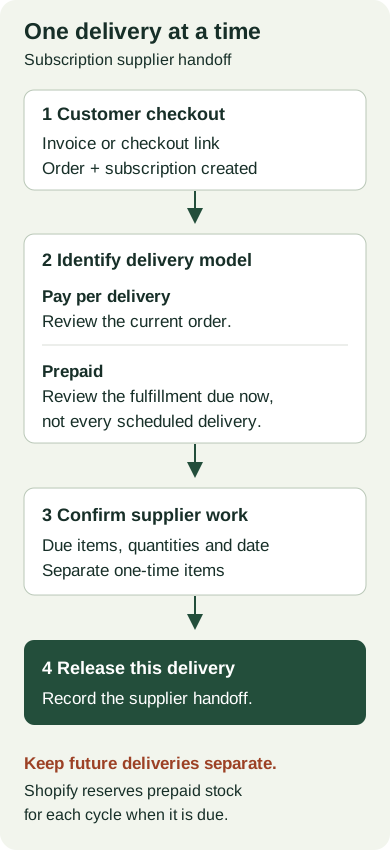
Shopify handles the two models differently. For pay-per-delivery subscriptions, the subscription app creates new orders at recurring intervals. Prepaid subscriptions instead use one order with scheduled fulfillments; a due fulfillment becomes Unfulfilled. Shopify also says inventory for a prepaid cycle is reserved when its fulfillment date arrives, rather than reserving the entire subscription at creation. See subscription fulfillment guidance.
Build the supplier handoff around the current delivery. Include the retail order reference, the specific due fulfillment where relevant, items and quantities, supplier reference, agreed dispatch date and latest confirmation. Before using a routing process for prepaid orders, verify that it can distinguish due items from later scheduled work. A paid order alone does not identify which installment should ship now.
For a hypothetical prepaid plan with three monthly deliveries, one pouch is due each month. The first order also includes a one-time scoop from another supplier. The first handoff is one pouch to the pouch supplier and one scoop to the accessory supplier. The next pouch delivery must not repeat the scoop or release the two remaining pouches early. Keep future supplier capacity in the planning record until each delivery is due.
Review first-order and recurring shipping separately
The shipping rate selected in a subscription draft applies to its first order. Shopify says recurring deliveries use the lowest-cost available shipping rate. Its draft-order rules also distinguish the first order's payment terms or deposit from later subscription billing. The recurring subtotal excludes shipping, taxes, duties and discounts.
Prepare separate first-delivery and later-delivery cost checks. Confirm who supplies each parcel, where it ships from and the expected service. Compare the customer-facing shipping arrangement with the supplier's charge for each delivery. Do not present the displayed recurring subtotal as the final delivered total, or copy a first-order shipping quote into every future supplier instruction without checking it.
Give subscription changes an owner
Editing an order does not change its subscription contract. Shopify directs merchants to their subscription app for changes affecting future fulfillments. Assign one person to reconcile a requested change with both the future plan and any work already handed to a supplier.
For merchants using Shopify Subscriptions, the contract controls include product and delivery changes, skipping an upcoming order, and pausing or canceling a contract. Those controls describe the customer subscription. Check an already-created order and its supplier handoff separately; a future-plan change is not evidence that a supplier has stopped today's parcel.
Also assign an exception queue. In Shopify Subscriptions, insufficient inventory can prevent an upcoming order from being created when inventory is tracked and overselling is disabled. The app's billing-attempt settings govern retries and the action after they fail. Review those settings before launch, identify who follows up, and avoid creating a second supplier request merely because the expected retail order has not appeared.
Test the second delivery as well as the first
Use these cases to assess your chosen subscription app and supplier workflow. Record the actual outcome and resolve failures before relying on the workflow.
| Case to test | Evidence to look for |
|---|---|
| Invoice sent, checkout incomplete | No supplier dispatch instruction from the draft alone. |
| Prepaid first delivery plus one-time item | Only due quantities reach the correct suppliers. |
| Next subscription delivery | The due order or fulfillment is identified; the one-time item is absent from that delivery. |
| Skip, pause or product change | The future plan and any already-created supplier work are reconciled separately. |
| Inventory or billing failure | An owner investigates the exception without duplicating the supplier request. |
In our supplier workflow, each connected supplier makes its own acceptance decision and fulfills through its Shopify order records. Keep that delivery-level confirmation separate from the customer's recurring agreement. Use the order-routing overview to review the ordinary handoff, then verify the subscription-specific cases before offering a recurring delivery promise.
Sources
- Subscriptions supported in draft orders - Shopify ChangelogShopify Changelog · Checked
- Shopify Help Center | Creating draft ordersShopify Help Center · Checked
- Shopify Help Center | Getting paid for draft ordersShopify Help Center · Checked
- Shopify Help Center | Managing and fulfilling subscription ordersShopify Help Center · Checked
- Shopify Help Center | Managing and fulfilling subscription ordersShopify Help Center · Checked
- Shopify Help Center | Managing subscription contractsShopify Help Center · Checked
- Shopify Help Center | Managing Shopify Subscriptions app settingsShopify Help Center · Checked
- Shopify Supplier Portal & Order Sync | FulfillRelayFulfillRelay · Checked
- Shopify Supplier Order Routing | FulfillRelayFulfillRelay · Checked