
Understand which return window applies
Within Shopify's configured rules, the order of checks matters:
- A final-sale designation prevents a return request even when an override matches.
- One matching override replaces the applicable default or market window.
- Several matching overrides use the shortest matching override.
- With no override, the applicable market window applies, or the store default if no market rule exists. Override behavior
For example, imagine a 60-day store default, a 45-day home-office collection override and a 20-day end-of-season collection override. An item in both collections uses 20 days. An item matching only the home-office override uses 45 days. These are illustrative settings, not recommended policy lengths.
The current Help Center labels market-specific return rules as early access for certain merchants. Check your admin before planning separate market policies. Return rules and availability
These settings describe Shopify's request controls. Review your policy and applicable consumer obligations with qualified advice before shortening a window or using final sale.
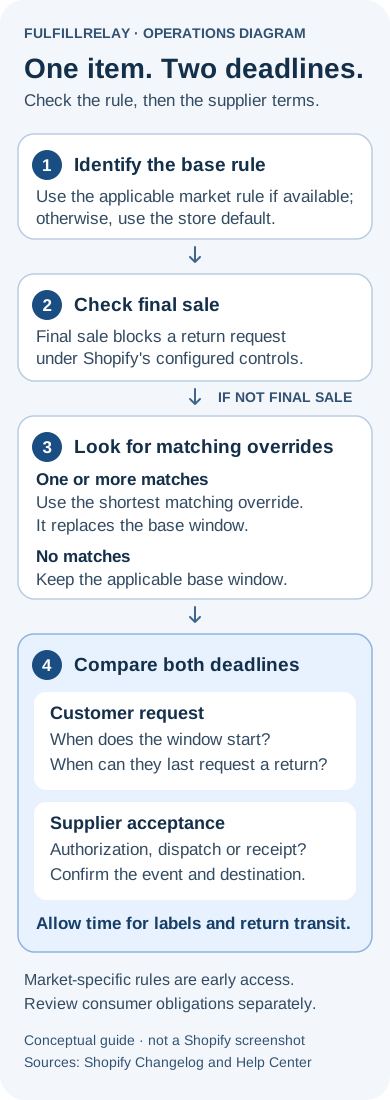
Compare the customer deadline with the supplier deadline
Create a short record for each supplier and the affected product variants. Put these questions next to one another:
- What event starts the customer's window, and when can they last request a return?
- Does the supplier require a request, authorization, dispatch or physical receipt by its deadline?
- Where must the goods go, and who provides the label?
- Who covers the return when your customer promise extends beyond the supplier's acceptance terms?
Record the actual terms and the date you confirmed them. Leave unresolved points visible rather than filling them with an assumed standard. A supplier's phrase such as “returns within 30 days” needs clarification if it doesn't name the starting event or required action.
As an illustrative timing test, suppose both clocks start at the same event. A customer can request a return after 20 elapsed days, but the supplier requires receipt by day 25. A seven-day return journey after that request reaches day 27, beyond the supplier deadline. Authorization or label delays could add more time. The numbers are invented to show the mismatch; use your own agreed terms and realistic transit estimates.
If that test fails, decide how you will honor the customer promise. Options to investigate include extending supplier acceptance, receiving returns yourself or budgeting for cases the supplier won't accept. Assign an owner to the decision before changing the storefront promise.
Check the starting event on split deliveries
Shopify offers a window starting at each item's delivery or at delivery of the order's last item. If delivery information is unavailable under the item-delivery setting, it uses fulfillment plus a transit buffer. Rule changes apply to future orders. Window timing
For a mixed-supplier order, record when each item arrived and which event your customer rule uses. Compare that with each supplier's terms. A supplier might measure its deadline from its own shipment while the customer window waits for a later item from another supplier.
Keep the terms associated with the original order available to support. When a customer contacts you after a policy change, check that order's timing before giving a deadline from today's settings. Add a review point for exchanged or newly added items rather than assuming their clock matches every original item.
Review collections and customer-facing policy together
Shopify documents that changing collection sources or conditions changes which products or variants are included. Collection maintenance
That makes collection membership part of your return-window review. Before a promotion, choose a sample item that belongs to two collections and inspect all matching overrides. Repeat the check when merchandising changes collection membership. A label such as “holiday gifts” doesn't tell you whether the item also belongs to a shorter-window collection.
Next, read the policy a customer can actually open. For a manually maintained policy, compare its wording with the settings. For an automated policy, Shopify says content follows relevant store settings, but you remain responsible for accuracy and compliance. It also advises checking alignment with a returns app's rules and instructions. Store policy guidance
Review product-page promises, help pages and support replies too. Give staff one clear explanation of the starting event and required customer action. Check each language you sell in, especially where a translated promise contains a different period or return destination.
Test the request path and the supplier handoff
With Shopify self-serve returns, a customer request goes to the merchant for review and can be approved or declined according to the policy. Self-serve workflow
Walk through your actual customer entry point in a controlled test. If you use a separate returns app, check its behavior directly. Record the variant, market, applicable window, starting event and result for these cases:
- An item with no override
- An item with one longer override
- An item in two overridden collections
- An item marked final sale
- A mixed-supplier order with different delivery dates
- A request close to the deadline, including time to obtain a label and return the parcel
The test should leave a named person responsible for any eligible request that needs supplier approval. Confirm the return destination before sending instructions. Avoid closing a case simply because a supplier hasn't responded.
If you use Shopify Collective with a supported third-party returns app, Shopify instructs you to align the relevant Collective window and fee settings with the app. Check that specific workflow separately. Collective returns policies
For help choosing the request workflow, read our native returns versus a returns app guide. Once goods arrive, our return inspection checklist covers the next handoff.
The useful outcome is an item-level promise your team can explain and carry out: a clear request deadline, a confirmed destination and a plan for the supplier's acceptance deadline.
Sources
Official Shopify sources checked on October 10, 2026. Feature availability and documentation can change; check the linked guidance and your own store before changing settings.
- Return window overrides now availableShopify Changelog · Checked
- Setting up return and cancellation rulesShopify Help Center · Checked
- Managing collection sources and conditionsShopify Help Center · Checked
- Adding store policiesShopify Help Center · Checked
- Self-serve returns and cancellationsShopify Help Center · Checked
- Returns policies in the Shopify Collective appShopify Help Center · Checked