
Establish which charge and tax service you are reviewing
Start with the return shipping fee charged to the customer, rather than the carrier's label cost or a restocking fee. Shopify's return rules support free return shipping, a flat fee per return, or customers purchasing their own labels. The customer fee can therefore differ from the amount your store pays a carrier. Return shipping costs
Check the order's destination and tax service before expecting the new calculation. Shopify excludes non-US destinations, tax-exempt orders and services such as Manual Tax or Basic Tax. It also says tax is not calculated on restocking fees. A fee is not automatically taxable simply because the destination is in the United States. Ask your tax adviser about the correct treatment for your store; this workflow does not determine tax obligations. Tax on return shipping fees
Follow the estimate into the final record
Shopify displays estimated tax when a return is created and records the final amount when the return is processed. Those taxes enter its tax reports automatically. Use the estimate to explain the expected outcome, then reconcile against the processed record. Estimate and final tax
| Point in the workflow | What to compare |
|---|---|
| Return creation | The customer shipping fee, estimated tax and any case-specific fee change |
| Return processing | The items being processed, fee treatment and final financial summary |
| Refund confirmation | The amount being issued and any refund already recorded |
| Accounting review | The processed return, refund record and tax report or connected export |
For a return processed in stages, Shopify applies the return shipping fee the first time the return is processed. Do not treat a later parcel as a reason to add that same fee again. Processing a return and issuing its refund can also happen separately, so a processed return does not by itself establish that the refund was issued. Processing returns
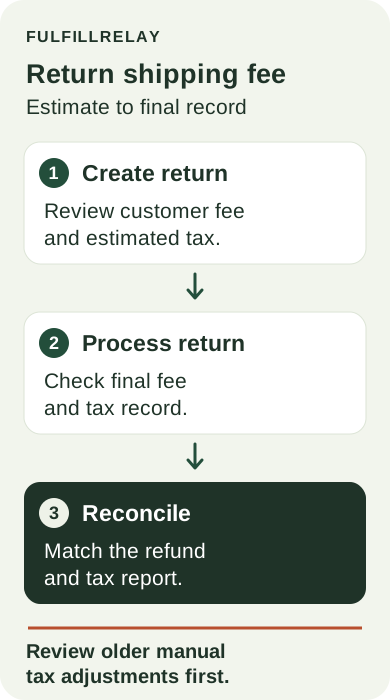
Review the manual adjustment before it runs again
Shopify specifically advises merchants with manual return-shipping-tax workarounds to review them to avoid counting tax twice. Merchants without those workarounds do not need to take action for the update itself. Shopify's implementation guidance
For stores that do have a workaround, trace one affected return through the support procedure and accounting handoff. Look for a spreadsheet tax line, a staff refund adjustment or an import rule that adds tax independently. Compare its purpose with the amount Shopify now records. Have the responsible finance owner resolve any overlap before changing a live rule; do not remove unrelated adjustments merely because their labels contain the word “tax.”
Check the exact refund path your team uses. Do not assume every refund screen has already deducted the fee. Check the processed return and displayed refund total before applying any manual deduction. Return fee guidance, return financials
Keep the request evidence connected to the decision
FulfillRelay Returns collects email-verified requests, reasons and photos in a branded portal. Your team reviews cases against its rules and explicitly confirms any Shopify refund. Carrier return-label PDFs are uploaded to the case; the app does not buy the postage.
Keep any approved fee exception with the case so the person confirming the refund can find it. For the receiving handoff, use our return inspection and restocking guide. The financial review should finish with a fee and tax record your team can explain, without a duplicate manual adjustment.
Sources
- Tax is now calculated on return shipping feesShopify · Checked
- Setting up return and cancellation rulesShopify · Checked
- Setting up return and cancellation rulesShopify · Checked
- Processing and managing returnsShopify · Checked
- Setting up return and cancellation rulesShopify · Checked
- Creating returns and exchangesShopify · Checked
- Shopify Returns Portal and Management | FulfillRelay ReturnsFulfillRelay · Checked